Do You Need a Trading VPS? When It Helps, When It Does Not, and When It Is Not Allowed
Full guide · 17 min read · last fact-check 2026-07-28
When it helps, when it does not, and when it is not allowed
Imagine that an automated strategy is managing an open trade at 2:00 a.m.
The strategy intends to move a stop, reduce exposure if volatility rises, and send live account data to a monitoring dashboard. The trader's laptop then loses power.
The broker may still hold a fixed Stop Loss that was already accepted by its server. But the Expert Advisor, dynamic exit logic, account connector, and alerts running on the laptop have stopped. The trader may not discover this until morning.
A Virtual Private Server, or VPS, can reduce that particular dependency. It provides a remote computer that can keep a trading platform, robot, connector, or approved API process running independently of the trader's home electricity, internet connection, and personal computer.
That does not mean every trader needs one.
A trader placing orders manually through a web platform may gain almost nothing from a VPS. A platform may already provide cloud execution. A funded program may prohibit remote servers. A poorly secured VPS may introduce more risk than it removes.
The useful question is not:
Which VPS should every trader buy?
It is:
Which parts of my trading process must remain online, where do those parts run, and does my broker, platform, or funded program permit me to host them remotely?
Short answer: Consider a VPS when approved trading logic, trade copying, or monitoring must run continuously on a desktop terminal and interruption would create material risk. You may not need one when you trade manually, rely only on broker-server orders, or use approved platform-native cloud execution. Never use a VPS until you have verified the current account rules, automation rules, geolocation conditions, and personal-use requirements.
1. What a trading VPS actually is
A conventional VPS is a virtual computer hosted in a data center. The trader normally connects to it remotely, installs a trading platform, and leaves the required software running.
For a typical Windows trading setup, the VPS may host:
- MetaTrader 4 or MetaTrader 5 terminals
- Expert Advisors and custom indicators
- Trade copiers
- Broker or exchange platform software
- An approved API strategy
- Account-monitoring connectors
- Logging and alerting tools
The trader's laptop becomes a control screen rather than the machine doing the continuous work. Disconnecting the remote-desktop window should not stop the applications on the server.
This is different from:
- A VPN: A network service that changes or secures the route between a device and the internet. A VPN is not a computer that runs a trading platform.
- Platform-native virtual hosting: A service built into a platform, such as MetaTrader Virtual Hosting, that runs a migrated platform environment without giving the trader a normal remote desktop.
- Platform-native cloud execution: A service, such as supported cTrader Cloud cBot execution, where the platform provider runs the algorithm.
- A dedicated server: A full physical server allocated to one customer. Most retail trading workloads do not require one.
These options solve related problems but have different permissions, capabilities, security responsibilities, and costs.
2. First determine where each instruction lives
The strongest VPS decision begins with architecture, not advertising.
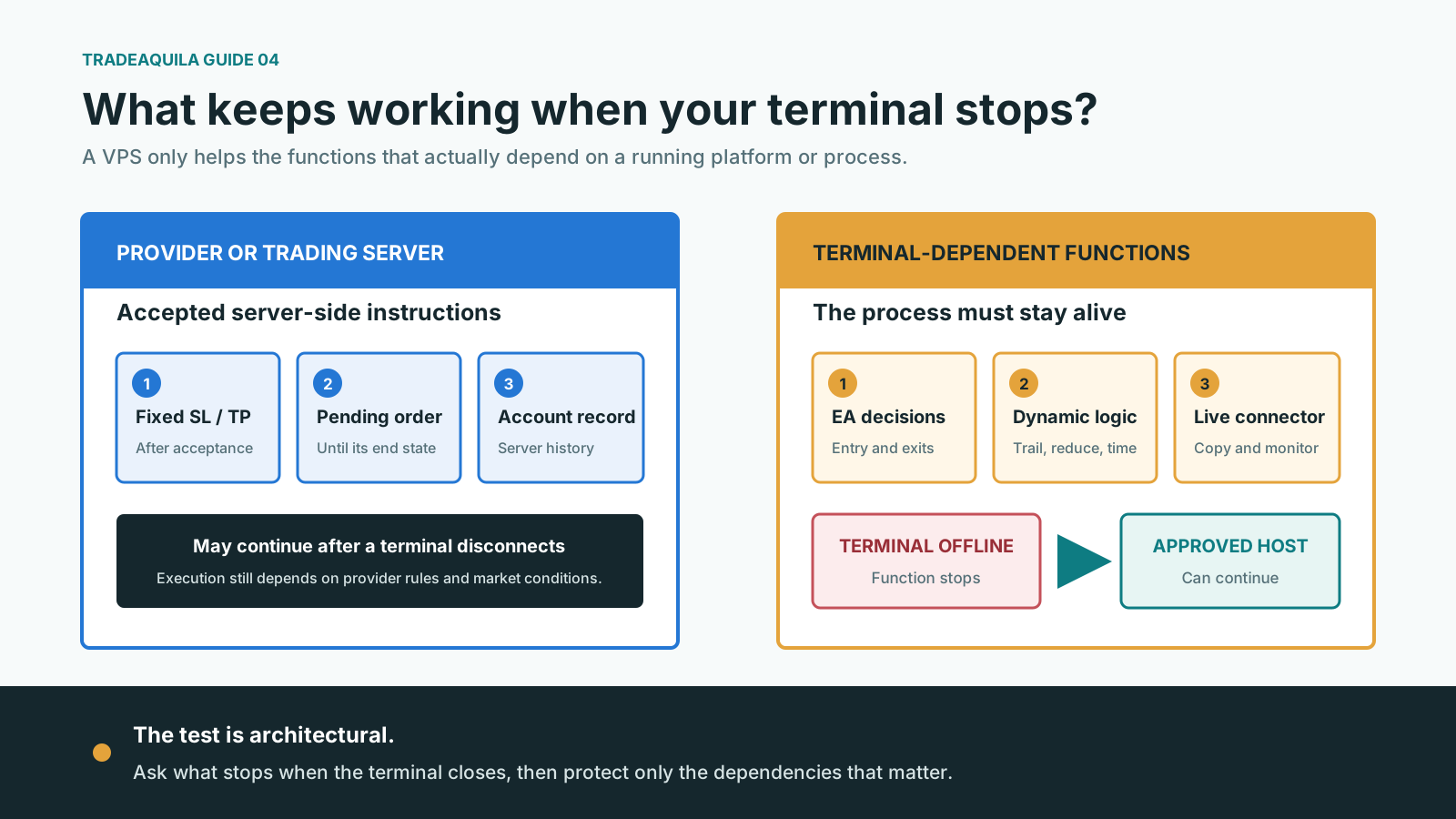
Every trading function runs somewhere:
| Function | Common execution location | What may happen if the trader's terminal stops? |
|---|---|---|
| Accepted fixed Stop Loss or Take Profit | Broker or trading server | It can normally remain active, subject to market conditions and broker rules |
| Accepted pending order | Broker or trading server | It can normally remain active until triggered, rejected, expired, or cancelled |
| Expert Advisor entry logic | Trader terminal, VPS, or approved cloud | No new decision is made while that process is offline |
| EA-managed exit or break-even logic | Trader terminal, VPS, or approved cloud | The dynamic management stops |
| MetaTrader trailing stop | Trader terminal or migrated virtual platform | It stops updating if the platform process stops |
| Trade copier | Local terminal, VPS, or provider cloud | Copying may stop or become delayed |
| Dashboard connector | Local terminal, VPS, or provider infrastructure | Live telemetry and remote actions may become unavailable |
| Broker account balance and trade history | Broker or provider server | Existing server records normally remain available |
MetaTrader 5 documentation makes the distinction explicit. Fixed Stop Loss and Take Profit instructions are stored and executed on the broker's server after they are accepted. An Expert Advisor running on the user's computer cannot manage a position when the computer or connection fails. MetaTrader's trailing stop is also terminal-side rather than server-side.
That distinction leads to a simple diagnostic:
Close the trading terminal in a controlled demo test. Which protections, decisions, alerts, and data flows stop?
Anything that stops is a continuity dependency. A VPS may be one way to move that dependency away from the trader's home computer.
3. Why traders use a VPS
To keep approved automation running
An EA, cBot running locally, NinjaScript strategy, or API process can only act while its execution environment is alive and connected.
A VPS can keep that environment available when:
- The trader closes a laptop.
- The laptop sleeps or reboots.
- Home electricity fails.
- The home router or internet provider fails.
- The trader is travelling.
- The strategy must operate outside the trader's waking hours.
This improves continuity. It does not prove that the strategy is profitable, correct, or compliant.
To keep terminal-side risk logic active
Some strategies use logic that is not held as a fixed order on the broker's server. Examples can include:
- Trailing-stop calculations
- Break-even changes
- Partial exits
- Time-based exits
- Volatility-based position reduction
- Basket-level loss limits
- Correlation or portfolio exposure controls
If this logic runs only inside a terminal, the terminal must remain available.
Even then, a client-side risk process should not be confused with a guarantee. The VPS, application, data feed, broker connection, and trading server can each fail. Where the platform and strategy permit it, a sensible fixed server-side catastrophic stop can provide a separate protection layer.
To maintain approved copying or account synchronization
A copier generally needs its source and destination connections to remain active. A disconnect can create missed trades, different fills, unmatched positions, or delayed exits.
Before using a copier on a VPS, verify:
- Whether copying is allowed
- Whether copying between the particular accounts is allowed
- Whether the accounts must belong to the same person
- Whether third-party or shared strategies are restricted
- Whether simultaneous or opposite positions create a rule breach
- Whether all account stages have the same rule
Technical capability is not contractual permission.
To keep monitoring and alerts live
A dashboard connector may need an active terminal to transmit:
- Open positions
- Equity and drawdown
- Order and deal events
- Exposure by symbol or account
- EA status
- Risk-limit events
If the terminal stops, broker records still exist, but the external dashboard may become stale until the connector returns and backfills the missing history. Real-time alerts and remote emergency controls cannot be assumed to work during that gap.
To reduce terminal-to-server transmission delay
A server geographically and operationally close to the broker's trading server may have lower network latency than a trader's home connection.
MetaTrader's native hosting interface compares the delay from the virtual server to the broker with the delay from the local terminal. Lower delay can improve the conditions in which a request is transmitted.
But lower latency does not guarantee:
- A better quoted price
- An available counterparty
- No slippage
- No requote or rejection
- Faster broker-side processing
- Priority over other orders
- Profitability
For a strategy that holds trades for hours or days, a difference of a few milliseconds may be economically irrelevant. For a legitimate latency-sensitive strategy, it may matter. The strategy's evidence should decide.
4. When a VPS is likely to be useful
A VPS becomes a serious consideration when all of the following are true:
- A necessary function runs in a local platform or process.
- That function must remain active while markets are open or positions exist.
- An interruption could cause a missed exit, unmanaged exposure, stale copying, or loss of critical visibility.
- Platform-native cloud execution does not support the full workload.
- The broker, funded program, platform, and account stage permit the setup.
- The trader can secure, monitor, test, and recover the server.
Common examples include:
- An MT4 or MT5 EA that enters and manages trades continuously
- A strategy with approved terminal-side trailing or basket controls
- An approved copier coordinating several personal accounts
- A desktop futures strategy that must stay connected through its trading session
- An approved API service that is not already hosted by its platform vendor
- An account connector required for continuous monitoring or emergency commands
The need is strongest when terminal downtime changes risk, not merely convenience.
5. When a VPS may add little value
You trade manually during defined sessions
If you open the platform only while you are present, make decisions manually, and close or protect positions before leaving, a VPS may simply add another machine to administer.
Your essential orders already reside on the provider's server
A swing trader using accepted server-side entry orders, Stop Losses, and Take Profits may not need a continuous desktop terminal for basic execution.
This does not remove gap, slippage, rejection, outage, or provider risk. It only means the user's computer is not required to keep those accepted instructions active.
Your platform already offers suitable cloud execution
Current cTrader documentation states that supported cBots can run in its cloud 24/7 independently of the user's device, without a separate VPS. The feature is limited to supported cloud workloads, and account limits or eligibility can vary by broker.
A separate VPS may still be needed if the algorithm depends on unsupported packages, desktop plugins, local files, custom network behavior, or another application. The correct answer depends on the exact program, not only the platform name.
Your automation is hosted by an approved service
Some broker APIs, copy services, or strategy platforms execute on their own infrastructure. Installing a second copy on a VPS may create duplication rather than resilience.
Downtime only delays reporting that can be backfilled
If a connector is used only for periodic performance reporting, and it reliably imports the complete broker history after reconnecting, uninterrupted hosting may be optional.
It becomes more important when users expect live risk alerts, current portfolio exposure, or an emergency action path.
6. Permission comes before performance
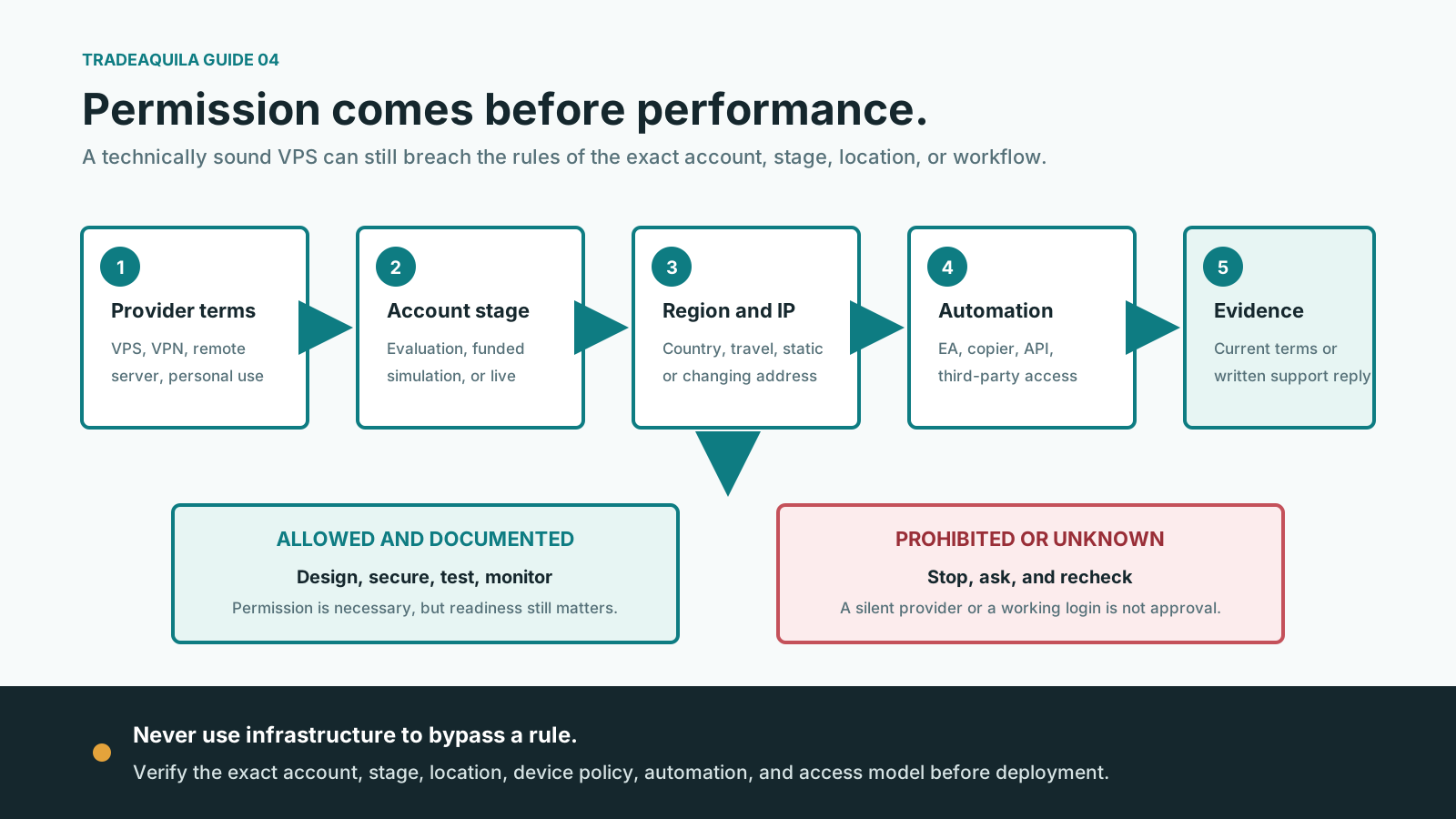
A VPS should never be used to bypass a rule, hide a location, imitate another person, or make prohibited automation harder to detect.
Before installation, review the current documents for the exact provider, platform, jurisdiction, account type, and program stage.
Ask separately about:
- VPS and remote-server use
- VPN or proxy use
- The VPS data-center country
- Static or changing IP addresses
- Travel and geolocation
- Automated strategies and APIs
- Trade copiers and account mirroring
- Third-party software
- Third-party access or managed administration
- Simultaneous logins and multiple devices
- Maximum order or server-request frequency
- Personal-use and credential-sharing rules
- Changes between evaluation, funded simulation, and live stages
The answers can differ sharply.
As of the 2026-07-28 fact check:
- FTMO states that VPN/VPS use is generally allowed, while warning MetaTrader and cTrader users not to connect from, or set VPS geolocation to, the United States. Its separate personal-use rules prohibit giving a third party access to the account.
- Topstep's current TopstepX API guidance states that trading activity must originate from the trader's personal device and that VPS, VPN, and remote servers are prohibited. It warns that VPS automation can lead to suspension or removal.
These are provider-specific examples, not universal industry rules. They also show why a generic statement such as "prop firms allow VPS trading" is unsafe.
If the documents are unclear:
- Ask official support a precise written question.
- Identify the account, platform, automation, VPS country, and purpose.
- Keep the dated reply and relevant terms.
- Recheck before changing provider, server region, strategy, or account stage.
Silence from a provider is not approval.
7. Three hosting models, with different trade-offs
A conventional Windows VPS
This is the most flexible model. The trader normally controls a full remote desktop and can install supported terminals, connectors, and utilities.
Potential advantages:
- Full desktop environment
- Multiple approved applications
- Support for software that needs DLLs or local files
- Flexible logging and monitoring
- Choice of provider, region, and machine size
Potential disadvantages:
- The trader is responsible for configuration and security
- Windows updates or application crashes can interrupt operation
- Resource contention can affect low-cost shared plans
- Remote desktop can be attacked if poorly secured
- Third-party management may conflict with personal-use rules
- One VPS is still one failure domain
MetaTrader Virtual Hosting
MetaTrader provides an integrated virtual platform that can migrate charts, Expert Advisors, indicators, and signal settings for a specific account.
It can be simpler than maintaining a Windows desktop, but it is not equivalent to a general-purpose VPS.
Current MetaTrader 5 documentation notes that:
- DLL calls are forbidden.
- Scripts are not migrated.
- Synchronization moves the local environment to the virtual platform in one direction.
- Automated trading is allowed in the virtual environment after migration.
- The local platform disables its corresponding automation to reduce duplicate execution.
- WebRequest URLs must be permitted before migration.
- Logs and resource use must be monitored through the platform.
- Accounts requiring one-time-password entry cannot use the autonomous virtual hosting model.
This means a custom EA may work while a connector that depends on a DLL, desktop service, or unsupported local process may not.
Platform-native cloud execution
In this model, the platform provider runs the supported strategy without a separate user-managed server.
This can reduce administration, but compatibility must be checked carefully. For example, cTrader currently limits cloud execution to cBots and documents different behavior for external packages, Windows-specific dependencies, network requests, and local storage.
The simplest hosting model that supports the complete approved workload is usually preferable.
8. A VPS is continuity, not immunity
A VPS removes some local dependencies. It does not remove the complete failure chain.
The following can still fail:
- The trading application
- The EA or strategy process
- Authentication to the account
- The VPS operating system
- The data-center host
- The data-center network
- The broker or provider connection
- The broker or exchange trading system
- Market data
- A third-party API
- The monitoring service
- The VPS subscription or payment
- The strategy logic itself
Cloud vendors describe reliability as a shared responsibility. A single virtual machine remains a single instance and can experience maintenance, software failure, network interruption, or a zone outage.
For retail trading, duplicating the entire strategy on two active machines is usually not a safe shortcut. Two simultaneously active copies can submit duplicate orders or fight over position state.
Resilience normally requires:
- One clearly designated active execution instance
- Broker-server protective orders where appropriate
- External health monitoring
- A tested recovery procedure
- A controlled standby or rebuild method
- Human access through an independent channel
Failover must be designed into the strategy. It should not be improvised by launching a second live copy.
9. Security is part of trading risk
A VPS may contain platform credentials, account data, proprietary algorithms, API keys, and software capable of submitting orders. Treat it as sensitive financial infrastructure.
Minimum security baseline
- Use a reputable host with clear ownership, support, and incident procedures.
- Use a unique long password for the server and separate credentials for every service.
- Enable multifactor authentication on the hosting control panel and approved remote-access path.
- Restrict remote access by firewall, gateway, or IP allowlist where practical.
- Keep Network Level Authentication enabled for Windows Remote Desktop.
- Do not expose unnecessary ports or services.
- Apply operating-system and platform security updates through a controlled schedule.
- Use least-privilege accounts for routine work.
- Encrypt backups and protect recovery codes separately.
- Never share the broker's master password with a VPS vendor or freelance administrator.
- Do not browse, open email attachments, or install unrelated software on the trading server.
- Log remote access and review unexpected login attempts.
- Remove old users, keys, terminals, and applications.
The United States Cybersecurity and Infrastructure Security Agency advises limiting exposed Remote Desktop Protocol access and, where it is required, closing unused ports, applying account lockouts and multifactor authentication, and logging access attempts.
If the trading provider prohibits VPN use, do not quietly add a VPN as a security measure. Ask what approved remote-access controls can be used without violating the account rules.
Managed VPS does not automatically mean safer
A managed provider may patch or maintain the operating system. It may also mean that another party has administrative access.
Check whether:
- Staff can view the desktop or files.
- Support requires the trading password.
- Backups contain credentials.
- Administrative access is logged.
- The arrangement violates personal-use terms.
- Data is stored in an acceptable jurisdiction.
A provider logo and an uptime claim are not a security audit.
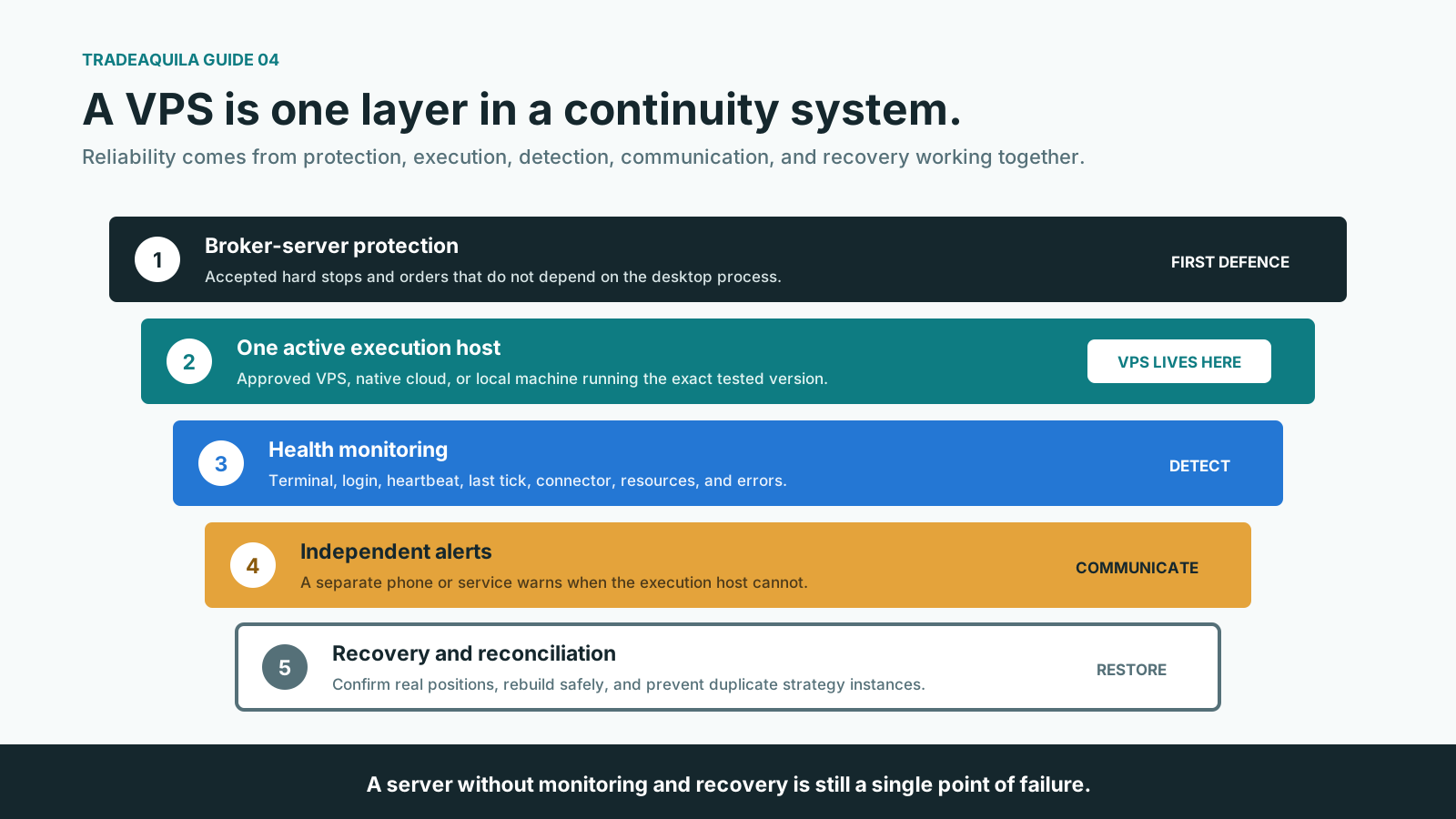
10. Build a continuity stack, not a lonely server
A serious deployment has several layers.
Layer 1: Broker-server protection
Use valid server-side protective orders where the strategy, account, and market structure permit them. Confirm from official platform and provider documentation which orders remain active when the terminal disconnects.
Layer 2: One active strategy instance
Document:
- The terminal and account
- The EA or strategy version
- Inputs and risk parameters
- Symbols and chart timeframes
- Required files, DLLs, APIs, and URLs
- The exact startup sequence
Layer 3: Independent health monitoring
Monitor more than whether the VPS responds to ping.
Useful signals include:
- VPS reachable
- Trading terminal process alive
- Account authenticated
- Trade-server connection active
- EA heartbeat current
- Latest market tick or API event current
- Dashboard connector heartbeat current
- CPU, memory, and disk within limits
- Subscription and certificates not near expiry
- No repeated order or authentication errors
Layer 4: Alert delivery outside the VPS
Send alerts to a phone or service that does not depend on the same server. Otherwise, the failed machine may also silence its own warning.
Layer 5: Recovery and emergency access
Maintain:
- Mobile or web access approved by the provider
- Broker or program support details
- A clean installation package
- Encrypted configuration backup
- A written restart and reconciliation procedure
- A decision rule for disabling automation
- A process for confirming actual broker positions before restarting
11. The TradeAquila monitoring case
For a connector-based dashboard such as AquilaSight, a VPS can serve a different purpose from strategy automation.
An MT5 connector may continuously send account state to the web dashboard. If the terminal or connector stops:
- The broker account can continue to exist and trade.
- Existing server-side orders can remain active.
- The dashboard's last values may become stale.
- Cross-account exposure may be incomplete.
- Live risk alerts may not fire.
- A remote flat command may have no active route to the terminal.
- Historical data may or may not backfill after reconnection.
This creates two distinct service levels:
- Reporting: Temporary gaps are acceptable if the complete history reliably backfills.
- Live monitoring and control: The connector needs a continuously available, monitored, and secured execution path.
We make that distinction visible. A green dashboard means the account connection and data freshness have been verified, not merely that the website loaded.
An emergency flat feature should also display:
- Last connector heartbeat
- Last broker-server contact
- Accounts currently reachable
- Command status for each account
- Any rejection or timeout
- Whether open positions still exist after the command
A VPS improves the availability of the connector. It cannot guarantee that an order is accepted or filled, and it should not replace server-side protection.
12. Five traders, five different answers
Samira: the manual London-session trader
Samira trades manually for two hours each morning. She is at her desk, uses hard server-side stops, and closes all positions before leaving.
Likely conclusion: A VPS is optional and probably unnecessary. A stable local setup, backup internet connection, and mobile emergency access may solve her actual risks more directly.
Daniel: the MT5 EA operator
Daniel's EA trades several sessions, adjusts stops dynamically, and sends data to a dashboard. His home laptop often sleeps at night.
Likely conclusion: A compatible VPS or approved MetaTrader hosting environment may be appropriate. He must verify provider permission, test every EA dependency, secure the server, and retain broker-side catastrophe controls.
Lina: the cTrader cBot user
Lina's cBot is fully compatible with cTrader Cloud and does not require an unsupported desktop plugin or external service.
Likely conclusion: Platform-native cloud execution may provide the required continuity without a separate VPS. She should still verify broker-specific cloud limits and monitor the cBot for errors.
Marcus: the TopstepX API trader
Marcus wants to move his API strategy from his personal computer to a remote Windows server.
Likely conclusion: Not under the current TopstepX API guidance reviewed for this article. The provider states that VPS, VPN, and remote-server trading are prohibited. He should use an approved personal-device architecture or obtain updated written guidance.
Aya: the performance-dashboard user
Aya trades manually but connects several accounts to a live risk dashboard. The connector can backfill trades after an outage, but real-time alerts and remote flat controls require an active terminal.
Likely conclusion: A VPS may be valuable for monitoring continuity even though it is not needed for her entry decisions. She must decide whether she needs reporting or genuine live-control availability.
13. How to choose a VPS after permission is confirmed
Do not begin with processor names or promotional discounts. Begin with the workload.
Compatibility
- Required operating system
- Supported terminal version
- DLL, file, browser, and API dependencies
- Number of terminal instances
- Platform and market-data licensing
- Provider permission for the server region and IP
Capacity
Measure the real application while markets are active:
- CPU use
- Memory use
- Disk use and log growth
- Network stability
- Number of charts, symbols, EAs, and accounts
Choose headroom for volatile periods and platform updates. The cheapest server that launches MetaTrader is not necessarily the server that can run several busy terminals reliably.
Location and network quality
Compare measured latency and stability to the broker or platform server from candidate regions. The closest city on a map is not always the best network route.
Test:
- Typical latency
- Variation in latency
- Packet loss
- Reconnection behavior
- Performance during the actual trading session
Reliability and recovery
Review:
- Uptime definition and service terms
- Planned-maintenance policy
- Host and network monitoring
- Snapshot or backup options
- Recovery time after failure
- Support availability
- Process if a data center or region fails
- What happens when payment or renewal fails
Security and control
Confirm:
- MFA options
- Firewall or IP restriction
- Administrative access policy
- Backup encryption
- Access and incident logs
- Data location
- Account deletion and data-removal process
Cost
Calculate the complete annual cost:
- VPS subscription
- Windows or platform licensing
- Backup storage
- Monitoring
- Static IP
- Support tier
- Platform-native hosting fees
- Time spent maintaining the server
Compare that cost with the operational loss the VPS is intended to reduce.
14. Deployment and testing checklist
Before deployment
- Obtain current permission from every relevant provider.
- Record the account stage and server country.
- List every required application and dependency.
- Confirm which protections are server-side.
- Define one active execution instance.
- Prepare a rollback and emergency-access plan.
In demo or simulation
- Install from trusted sources.
- Reproduce the exact account, charts, symbols, inputs, and time settings.
- Test market open, close, and reconnect behavior.
- Simulate loss of remote-desktop access.
- Restart the terminal.
- Restart the VPS.
- Interrupt the trade-server connection.
- Confirm alert delivery.
- Confirm dashboard freshness and backfill.
- Confirm no duplicate orders appear.
- Inspect platform, EA, and operating-system logs.
Before live or funded use
- Reconfirm provider permission.
- Place the smallest useful test.
- Verify actual broker positions independently.
- Confirm accepted Stop Loss and Take Profit orders.
- Test the emergency procedure.
- Record the deployed version and settings.
During operation
- Review logs and heartbeats daily.
- Reconcile platform and dashboard positions.
- Apply updates through a planned process.
- Test recovery periodically.
- Recheck provider rules after any notice or account-stage change.
15. A neutral self-assessment
Answer yes, no, or unknown.
Operational need
- Does essential logic stop when my current terminal closes?
- Must that logic run while I am asleep or away?
- Would a 30-minute interruption materially change risk or positions?
- Does the workload depend on terminal-side exits, copying, or live telemetry?
- Is there no suitable platform-native cloud option?
Permission
- Does the exact provider permit VPS or remote-server use?
- Is my proposed server country permitted?
- Is my automation, copier, connector, or API use permitted?
- Does the setup comply with personal-use and credential rules?
- Have I checked every account stage?
Readiness
- Can I secure remote access with approved controls?
- Can I monitor the terminal, account connection, and strategy heartbeat?
- Do I have an independent alert channel?
- Do I have a tested restart and position-reconciliation procedure?
- Can I prevent two strategy copies from trading simultaneously?
Interpreting the result
- Many
yesanswers in operational need, with every permission answer confirmed, support considering a VPS or compatible native host. - Mostly
noanswers in operational need suggest a VPS may be unnecessary. - Any
unknownpermission answer means stop and verify. - Weak security or recovery readiness means the deployment is not ready even if the VPS is allowed.
This is a filter, not a score.
16. What a trustworthy VPS recommendation should disclose
A neutral comparison should state:
- Whether the service is a general VPS or platform-native host
- Supported operating system and applications
- Data-center regions
- Measured methodology for latency claims
- Resource limits
- Backup and recovery terms
- Security controls
- Administrative-access policy
- Planned-maintenance process
- Complete recurring cost
- Affiliate or sponsorship relationship
- Last-checked date
We never rank a VPS higher because it pays more commission. Commercial placement stays separate from organic suitability.
The first result should also be allowed to say:
You do not need a VPS for this setup.
That answer protects both the trader and the platform's credibility.
Conclusion
A trading VPS is not a badge of professionalism. It is infrastructure for a specific operational dependency.
It can be valuable when approved automation, terminal-side risk logic, copying, or live account monitoring must continue independently of a personal computer. It can reduce exposure to home power, internet, sleep, and device failures. A well-located server may also improve terminal-to-provider network conditions.
It may be unnecessary when trading is manual, essential orders are already server-side, temporary reporting gaps can be backfilled, or the platform provides suitable cloud execution.
It is inappropriate when the provider prohibits remote servers, the proposed location violates account terms, or the setup depends on credential sharing or prohibited automation.
The correct sequence is:
- Identify what must stay online.
- Determine where each function runs.
- Verify permission for the exact setup.
- Choose the simplest compatible hosting model.
- Secure and monitor it.
- Test failure and recovery before depending on it.
TradeAquila principle: A VPS should reduce a verified operational risk, not create a new compliance, security, or single-point-of-failure risk.
Educational and source note
This article is educational and does not provide investment, cybersecurity, legal, or provider-specific advice. Trading is risky, and automation can create or amplify losses rapidly.
Platform capabilities, provider rules, jurisdictions, cloud limits, and security guidance change. The examples were checked on 2026-07-28 — verify the current terms yourself before any purchase or deployment.
Primary sources consulted:
- MetaTrader 5: Virtual Hosting registration and latency comparison
- MetaTrader 5: Virtual Hosting migration and limitations
- MetaTrader 5: Working with the virtual platform
- MetaTrader 5: Server-side Stop Loss and Take Profit
- MetaTrader 5: Client-side trailing-stop behavior
- cTrader: Cloud execution features
- cTrader: Cloud workload requirements
- FTMO: VPN and VPS guidance
- FTMO: Forbidden trading and personal-use rules
- FTMO: Strategy and EA guidance
- Topstep: TopstepX API, VPS, VPN, and remote-server guidance
- CISA: StopRansomware security guide
- Microsoft: Plan multifactor authentication for Remote Desktop Services
- Microsoft: Reliability in Azure Virtual Machines
- AWS: EC2 instance status checks
At the time of fact-check (see date above), TradeAquila had no commercial relationship with the providers cited as examples in this article. A future relationship would not change the editorial analysis or organic suitability logic.